POS loyalty program: Module vs platform and how checkout integration works
When a loyalty module built into your POS is enough, when a dedicated platform fits better, and how checkout integration works step by step.

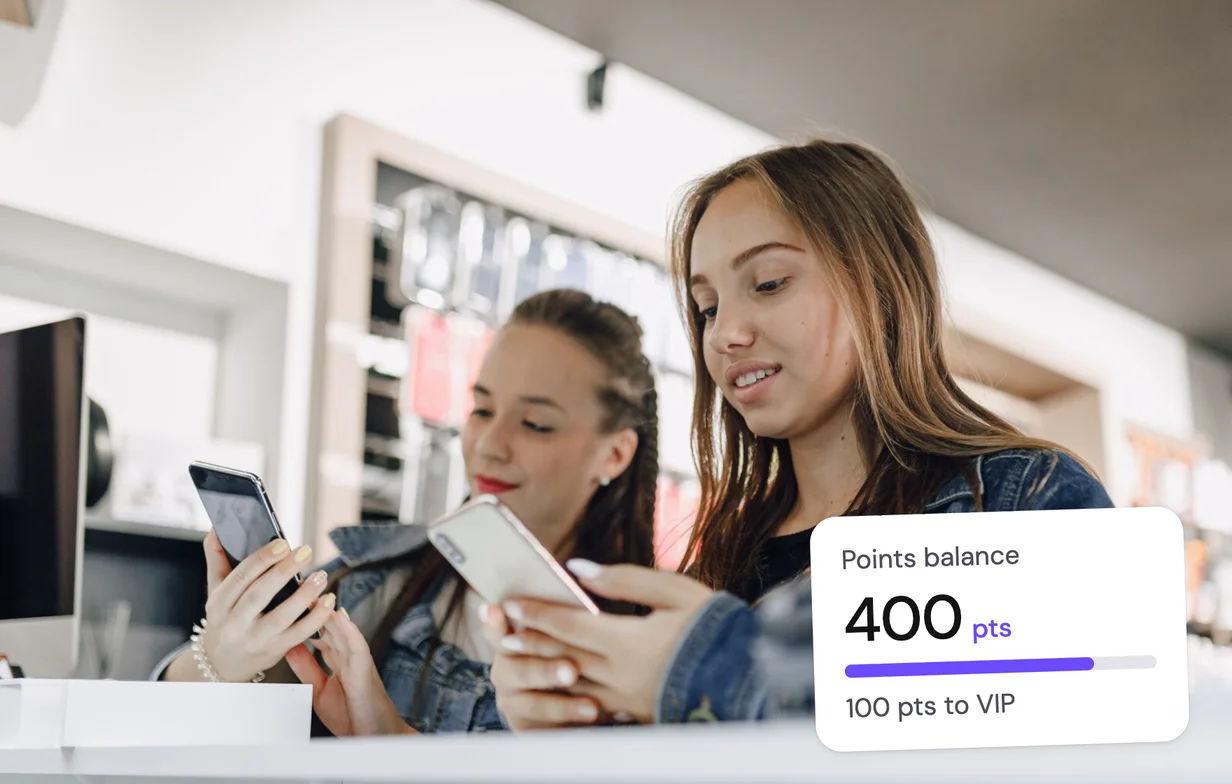
A POS loyalty program lets members identify themselves at checkout and earn or redeem rewards in the same transaction. The main decision is architectural: use the loyalty module built into the point of sale (POS), or run a dedicated loyalty platform connected to every till through an API.
A built-in module fits one POS vendor in one country with simple points or stamps. A platform fits several POS vendors, several countries, or an app and ecommerce channel that must share one member balance.
What is a POS loyalty program and how does it work at checkout?
A POS loyalty program links each sale at the point of sale (POS) to a known member, then applies real-time earn and redemption inside the same transaction. Everything starts with member identification at checkout, by phone number, QR code, card, or wallet pass.
Open Loyalty provides an API-first loyalty engine, delivered as managed SaaS on AWS, that enterprise retailers and restaurant groups connect to their point-of-sale systems.
To compare what a dedicated platform should offer beyond basic points, review the core loyalty management system features before you decide.
Should loyalty live in the POS or in a dedicated platform?
A loyalty module built into the POS suits one POS vendor in one country, and a dedicated loyalty platform connected through an Integration API suits everything beyond that. The platform approach also extends online, since ecommerce loyalty software can share one rule set and one member balance with your stores.
On effort, the built-in module sits in the middle: it costs less than a custom build and works on day one, but its rules and member data live inside one vendor's data model, so each extra POS vendor, country, or channel means a separate program to run.
A custom build gives full control, but you also own uptime, fraud controls, and wallet passes, which the true cost of building a custom loyalty program in-house breaks down. Teams that would prefer not to carry that burden can adopt enterprise loyalty software, which handles those layers for them.
Our assessment of the three options against the conditions that usually decide the choice:
| Condition | Custom build | Module built into the POS | API-first engine (dedicated platform) |
|---|---|---|---|
| Several POS vendors | One integration per POS, built and maintained by you | One vendor only; other tills need another program | One Integration API for every till |
| Multiple countries | Currency and legal-entity logic built by you | Depends on the markets the POS vendor supports | Multi-tenancy per country, currency, or legal entity |
| Store, ecommerce, and app | Possible, with integration work per channel | In-store first; online and app need add-ons | One member balance across channels |
| Tiers, challenges, partner rewards | Anything you fund and maintain | Points and stamps; tiers sometimes; challenges and partner rewards rarely | All supported, with caps and rule priority per campaign |
| Franchise settlement | Custom ledger work | Balances sit per location or vendor account | One member balance; the store ID on each transaction shows where points were earned and redeemed |
Multiple countries is the row that most often breaks the module: s.Oliver manages loyalty rules, rewards, and campaigns across several countries without depending on a POS system, which a module tied to one till cannot do.
Zambrero, an Australian Mexican restaurant franchise, replaced paper stamp cards (a free item every ten purchases) with one digital program across app, web and in-store in nearly 300 restaurants. After launching in February 2026, the program reached 150,000 members in five months, and reward redemption tripled within three months.
The module still wins in one case: a single brand, one POS vendor, a points-only program, and no plan to add channels, where a platform would add an integration project for rules the module already handles.
How do you know a built-in POS loyalty module has been outgrown?
A loyalty module built into the POS has been outgrown when two or more of the signals below appear at once. A single signal can usually be handled with configuration, and a dedicated loyalty platform becomes the better fit once they stack.
Among companies replacing their loyalty setup, 81.2% cite legacy limitations, according to the 500+ industry conversations behind Open Loyalty's Loyalty Program Benchmark Report 2027.
| Signal | What breaks inside the module |
|---|---|
| A second POS vendor | Rules and member balances split across two data models, so points do not follow the member between tills |
| A second country or currency | Rule sets, currencies, and legal entities get duplicated by hand per market |
| An app or ecommerce channel | Online and app purchases cannot earn or redeem against the in-store balance |
| Tiers or challenges | The module supports flat points or stamps, but tier status and challenge progress across channels need a separate rules engine |
| Cross-brand or partner rewards | A reward earned at one brand cannot be redeemed at another, and franchise settlement has no owner |
Count the signals at planning time, before member balances grow, because in our view migrating a small member base costs less than migrating a large one, though that depends on how much custom logic the module already holds. The loyalty platform migration checklist covers moving balances and tiers without losing them.
A dedicated loyalty platform keeps rules in one place and treats each POS as a connected channel, so multi-country rules can change without waiting on any POS release. For a closer look at that setup, see how modern platforms handle loyalty system architecture.
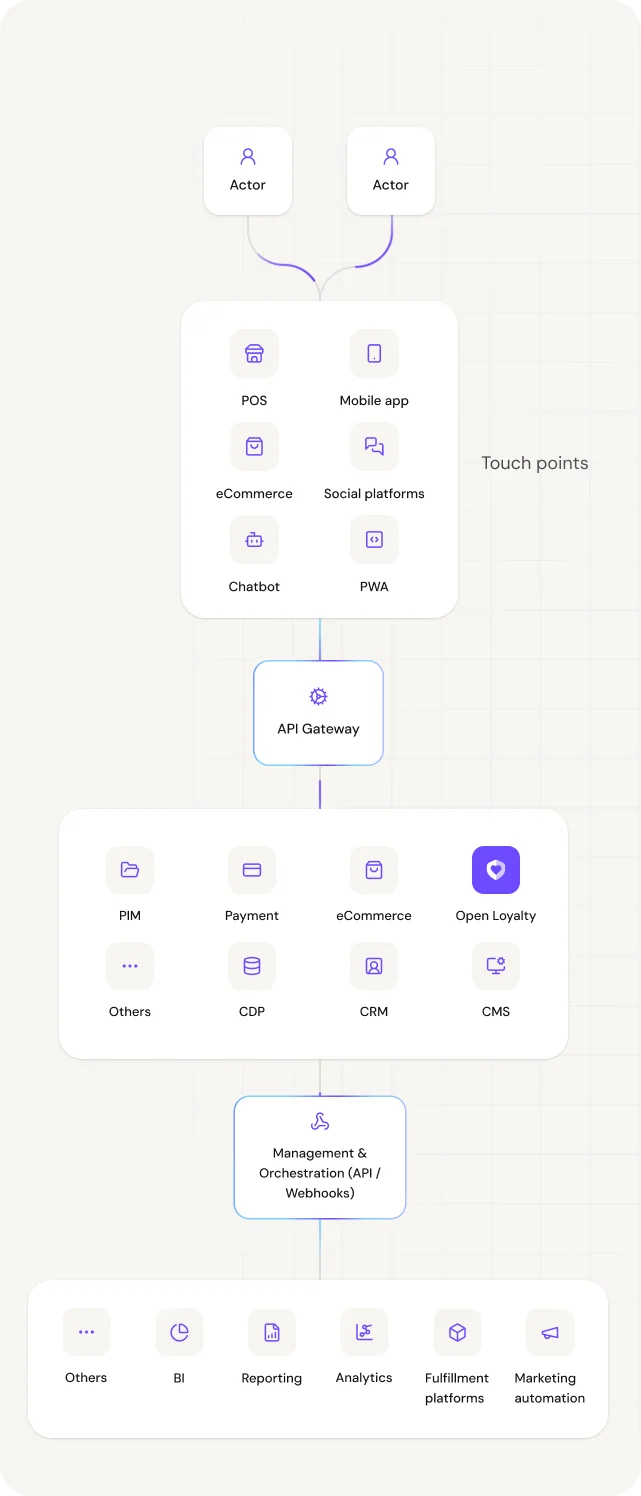
One caveat: with a single POS vendor, one country, and in-store sales only, the module is usually enough, and the platform route would add integration work that your developers or a partner must build.
How does a loyalty checkout integration work step by step?
A loyalty checkout integration runs in a fixed order: identify the member, validate rewards against the basket, redeem, then post the completed sale to earn points.
At each step, the till calls the Integration API, the set of REST endpoints built for real-time loyalty traffic:
- Identify. Member identification at checkout starts with a phone number, a card, a QR code in the app, or a wallet pass. The scanner reads the pass barcode like any other code, and the client's wallet service issues the Apple Wallet or Google Wallet pass. The call returns the member ID and balance.
- Validate. The POS sends line items, SKU, and store ID, and the platform returns the coupons and rewards that apply, with campaign rules, caps, and velocity limits already resolved.
- Redeem. The cashier applies the chosen reward, and the POS recalculates the total before tender (the payment method).
- Earn. After payment, the POS posts the sale with its document number, the unique receipt ID. A transaction with an existing document number is rejected, so a retry after a timeout cannot award points twice.
- Notify. Webhooks, messages the platform pushes to an HTTP endpoint or an AWS SQS queue, update the app, CRM, or analytics stack.
The real-time earn and redemption calls have to fit inside the customer's wait at the till, so Open Loyalty's Integration API targets P95 latency of 300 ms or less, P99 of 500 ms or less, and a 1 second maximum. P95 means 95 percent of calls finish within that time, and P99 means 99 percent do.
Slow calls change cashier behavior, and that change is the failure to design against: when identification or validation hangs, cashiers are likely to skip the prompt to keep the line moving, and the sale posts as a guest purchase.
No error appears in the logs, but member transaction share falls. We recommend a POS timeout at the 1 second platform maximum, with a queued transaction as the fallback, since guest purchases are stored as not matched and assigned to the member after registration.
How do returns, guest purchases and offline mode work at the till?
Returns, guest purchases and offline mode work at the till when every transaction carries a stable document number: the receipt ID the Integration API uses to recognize a sale.
Idempotency means that sending the same request twice has the same effect as sending it once. The Integration API gets it from the document number check described above, which is what makes retries and offline replays safe.
Test these failure modes before launch:
| Failure | What breaks | Safeguard |
|---|---|---|
| Retry after a timeout | Points earned twice for one basket | Reuse the same document number on every retry |
| Return after points were redeemed | Balance goes negative or points are refunded twice | Send the return linked to the original sale through linkedDocumentNumber; set a policy for already-spent points before launch |
| Split-tender basket | Points paid, card paid, and earn calculated on the full total | Send each tender line (type and amount only, never card numbers, per PCI Security Standards Council guidance) so rules can exclude the points-paid portion |
| Overlapping campaigns | One basket triggers two rewards | Set each campaign to sum all rules or let priority win, with caps and limits |
| Offline queue replay | A return arrives before its sale | Replay queued transactions in till-timestamp order with their original document numbers |
| Early guest purchase | Sale made before sign-up earns nothing | Post it as a guest sale; it is stored as not matched and assigned to the member after registration |
For returns, units stay pending until the return window closes, so points are unlikely to need reversal after the member has spent them. A shorter window means faster points but more exposure to reversals, which makes the window length a business decision as much as a technical one.
For offline mode with queued transactions, we recommend allowing earn while disconnected and restricting redemption to a low cap or disabling it, because the till cannot verify a balance it cannot reach, and replayed redemptions are where fraud controls such as velocity limits matter most.
How do kiosks, self-checkout and pay-at-pump change identification?
Kiosks, self-checkout and pay-at-pump change member identification at checkout because no cashier asks for the member, so the device itself must capture the ID. Three methods compete, and they differ in speed and in where members give up (the ranking below is our own judgment).
| Method | Speed | Drop-off risk | Best fit |
|---|---|---|---|
| QR code from a wallet pass or app | One scan | Low if the pass sits on the lock screen; higher if the member must open an app first | Self-checkout and kiosks with a scanner |
| Card barcode or tap | One scan | Members who left the card at home skip identification | Pumps and kiosks with a reader |
| Phone number on a keypad | Slowest | Highest, because typos and queue pressure cause abandonment and unmatched purchases | Fallback on every device |
We recommend a wallet pass QR as the primary method, since Apple Wallet and Google Wallet passes can carry a barcode, with phone entry as the fallback. Identification must come before payment, because after the tender the loyalty call has nothing to attach to.
At the pump, that means prompting at the start of the session, before the member authorizes the card. Drop Tank, a US fuel loyalty provider serving pay-at-pump and convenience store programs, runs its multi-tenant loyalty engine on Open Loyalty alongside its existing Oracle database. Our guide to loyalty programs in fuel retail covers the wider fuel picture.
Early signs that identification is failing include a falling share of transactions carrying a member ID on one device type, more phone-entry retries, and purchases that match no member afterward. Compare device types against each other, because a drop at the pumps alone usually points to where the prompt sits in the session.
Which integration pattern fits your POS estate?
A direct call from the POS to the Integration API fits estates with one or two POS vendors, while middleware, batch import, and receipt scanning cover the rest.
Integration is the challenge loyalty teams name most often: 28.6% put it first in the annual survey behind Open Loyalty's Loyalty Program Benchmark Report 2027, ahead of strategy (26.8%) and data (25%).
A dedicated loyalty platform exposes a REST API, and because Open Loyalty has no pre-built connectors for named POS vendors, your team, a partner, or a POS middleware vendor builds the call. Webhooks run the other way: the platform posts an event, such as a reward issued or a tier change, to your HTTP endpoint or an AWS SQS queue, so the POS or CRM reacts without polling.
The four patterns side by side (the effort ratings are our own judgment):
| Pattern | Fits when | Effort | Real-time limit |
|---|---|---|---|
| Direct API from the POS | One or two POS vendors that allow custom code at checkout | Highest per POS type, lowest after | Full: earn and redeem in the same transaction |
| POS middleware or plugin | Many POS types or franchisee-owned tills; middleware (a translation layer between each POS and the API) converts their messages into API calls | Medium: one adapter, one extra system to monitor | Real time if it sits in the till path; the extra hop uses part of the latency budget |
| Batch or receipt import | POS cannot call out at checkout but can export files | Low | Earn only, after the file loads; no redemption at the till |
| Receipt scanning | Brand does not own the till (wholesale, marketplace, franchise partners) | Low on the store side | Delayed; the member submits after purchase and needs fraud checks |
Receipt scanning is its own case, covered in receipt scanning in loyalty programs.
The decision follows from which POS systems you cannot change: go direct where a till can call out, build one middleware adapter that serves every POS type where you run many vendors, and use batch import for legacy tills that cannot be modified, knowing that members cannot redeem there.
Patterns can coexist because the platform works from your customer ID, so a flagship region can run direct API while older stores feed nightly files into the same member record.
Whichever pattern you choose, keep duplicate protection by document number in place: if a retry or a re-sent file repeats a transaction, the platform rejects it. The POS integration section of our tech stack guide covers the wiring in more depth.
What data must the POS send with every transaction?
Every POS transaction sent to the Integration API, the REST interface a loyalty platform exposes for real-time traffic from the till, needs a document number, member identifier, store ID, line items with SKU, tender type, and timestamp, plus a linked document number on returns.
The payload, field by field, for the team that builds the call:
| Field | What to send | Why it matters |
|---|---|---|
| Document number | Unique receipt or ticket ID | Duplicate protection: a transaction with an existing document number is rejected, so the till can retry after a timeout without double-awarding points. |
| Member identifier | Your own customer ID, resolved from phone, QR, card, or wallet pass | The engine is identity-agnostic and runs on your ID. If the field is empty, the sale is stored as not matched and assigned to the member after registration. |
| Store ID | Location code | Drives store-level rules, reporting, and franchise settlement. |
| Line items | SKU, quantity, unit price, discount applied | Lets rules reward categories or products, and makes partial returns possible. |
| Tender | Payment type only: cash, card, wallet, gift card | Supports tender-based rules and fraud checks. |
| Linked document number | Original sale's number, sent as linkedDocumentNumber on a return | Ties the return to the original sale. Units stay pending until the return window closes. |
| Timestamp | Time of sale at the till | Keeps queued offline transactions in the right order when they replay. |
Send the tender type and never card numbers, because the PCI Security Standards Council restricts storage and transmission of the primary account number, CVV, and magnetic-stripe data, and a loyalty call needs none of them.
In the other direction, the platform sends webhooks: event messages such as a reward issued, posted to an HTTP endpoint or AWS SQS (Simple Queue Service). AWS documents that standard SQS queues deliver each message at least once, so build the consumer to tolerate repeated messages.
Which POS loyalty KPIs show the program works?
Member transaction share, the percentage of POS transactions that carry a member identifier, is the first KPI to track, because every other loyalty metric is calculated on identified sales only.
Assume a 20-store chain with 100,000 transactions in a month, 38,000 of them tied to 12,000 distinct members (illustrative figures).
| KPI | Calculation with assumed inputs | Pitfall |
|---|---|---|
| Member transaction share | 38,000 / 100,000 = 38% | A member who skips the prompt counts as a non-member, so the number measures identification at checkout and says nothing about enrollment. |
| Member AOV vs non-member AOV | $62 vs $50, so members spend 24% more | Members were often your best customers before joining. Compare the same members before and after enrollment, or against a holdout group. |
| Visit frequency | 38,000 / 12,000 = 3.2 transactions per member per month | Anonymous shoppers have no ID, so their frequency cannot be counted per person. Compare against a non-member estimate or the members' own history. |
| Redemption rate | Rewards redeemed / rewards earned in the same period | Counting only unredeemed balances hides expired rewards. Digital stamp cards make this rate measurable per milestone. |
Real-time earn and redemption calls keep these counts clean, because each transaction is recorded once with its member, store, and document number, while batch imports add days of lag and duplicate risk.
Benchmark the AOV and frequency gap against your own pre-launch data, and watch the redemption curve, which shows adoption faster than sign-ups do.
What does a realistic POS loyalty implementation plan look like?
A realistic POS loyalty implementation runs in four phases over about three months, from payload scoping to chain-wide rollout. EQUIVA went live in three months with its program integrated with POS, CDP, newsletter, eCommerce and app, and the ALDO Group launched in the US, UK and Canada three months after its proof of concept.
The week ranges below are our own illustrative planning assumption:
| Phase | Weeks | Work | Exit criteria |
|---|---|---|---|
| 1. Scope and payload | 1-2 | Choose member identification at checkout (phone, QR, card, wallet pass). Map what the till sends: line items, SKU, store ID, tender. | POS owner and loyalty team sign the payload spec |
| 2. Build and test | 3-6 | Connect earn, redemption and returns to the Integration API. Build offline mode with queued transactions. | Replayed sales create no duplicates; a return reverses points; queued sales sync after reconnect |
| 3. Pilot | 7-9 | Run three to five stores of mixed size and traffic. | Member transaction share holds steady for two weeks; till errors stay within the agreed rate |
| 4. Rollout | 10-12 | Release stores in waves. | Each wave meets the pilot exit criteria before the next starts |
Several POS vendors or franchise settlement rules will stretch phase 2, while cashier training can fit one short session: a single prompt at the till ("Phone number or app code?") and what to do when the till is offline.
We recommend tying store incentives to member transaction share, because every other KPI is measured on identified sales.
Build or buy a POS loyalty integration?
Buy a dedicated loyalty platform and connect it to the POS through an Integration API when you run several POS vendors, countries, or channels, and build in-house only when loyalty logic is your product.
The three options side by side:
| Option | Fits when | Main cost | Main risk |
|---|---|---|---|
| In-house build | Loyalty rules are a differentiator | Rules engine, points ledger, fraud controls, and on-call staff, plus the POS work | Upkeep outlasts the project team |
| Loyalty module built into the POS | One POS vendor, one country, simple points or stamps | Low licence cost | Rules stop at the vendor's roadmap and the vendor's tills |
| Dedicated loyalty platform (managed SaaS) | Mixed POS estate, multiple markets, store plus ecommerce plus app | Subscription plus the POS-side integration work | You still build or commission the till integration |
Open Loyalty is fully managed SaaS on AWS, so there is no infrastructure to run, but the POS-side work remains yours, a partner's, or a POS middleware vendor's. Our full cost breakdown of building in-house covers the engineering lines that rarely appear in the first estimate.
Franchises add a cost question that no option answers by default: who pays when a member earns at one location and redeems at another? We recommend settling it at the franchisor level, with the brand funding reward liability from a central marketing fund or charging franchisees a per-redemption fee fixed in the franchise agreement.
Agree the rule before launch, because the platform can record where each reward was earned and redeemed but cannot decide who pays.
Plan your POS loyalty integration
Plan your POS loyalty integration around one choice: a loyalty module built into the POS, or a dedicated loyalty platform connected through an Integration API.
Open Loyalty's Integration API handles earn and redemption at the till within the latency limits above, through 250+ REST endpoints and webhooks to an HTTP endpoint or AWS SQS.
A technical walkthrough shows your developers how the transaction payload, offline queueing, and duplicate protection by document number would work against your POS before you commit to scope. Book a demo and we will walk through the API with your team.
POS loyalty program FAQs
What is a POS loyalty program?
A POS loyalty program lets members identify themselves at the point of sale (POS) by phone number, app QR code, card, or wallet pass, then earn or redeem rewards within the same transaction. The setup matters most for brands where the majority of sales still happen at the till.
How do POS loyalty programs work?
After member identification at checkout, the till sends the member ID and basket to the loyalty engine through an application programming interface (API), and the engine returns points earned or validates a reward before payment. Open Loyalty's Integration API targets P95 latency of 300 ms or less, meaning 95% of calls finish that fast, so the loyalty step does not hold up the queue.
Can a loyalty program work with any POS system?
A dedicated loyalty platform works with most POS systems that can call a REST API, run middleware, or export transactions in batches, and receipt scanning covers tills the brand does not own. Open Loyalty has no ready-made connectors for named POS vendors, so the client, a partner, or middleware builds the connection.
What happens to loyalty when the POS is offline?
With offline mode and queued transactions, the till stores earn events locally and sends them when the connection returns. Retries are safe because Open Loyalty rejects any transaction whose document number (the receipt's unique ID) already exists, though we recommend limiting offline redemptions, since the till cannot verify the member's balance.
POS loyalty module vs loyalty platform: Which is better for multi-location brands?
For multi-location brands running several POS vendors, countries, or channels, a dedicated loyalty platform fits better, because it keeps one member balance across stores, ecommerce, and app, which matters once tiers, challenges, or franchise settlement enter the rules. A loyalty module built into the POS fits a single-vendor estate with simple points or stamps.
How long does a POS loyalty integration take?
A scoped integration can reach launch in about three months. The ALDO Group went live in the US, UK, and Canada three months after its proof of concept on Open Loyalty, which is one reference point to plan against: each extra POS vendor adds till-side development, and that work tends to set the schedule.
About the authors
Kacper is an expert senior marketer with over 10 years of experience driving demand generation and data analytics across B2B and B2C enterprise sectors.